Dual PC vs Single PC Streaming: Do You Really Need Two Computers?
Quick answer: for most new streamers, one PC with a hardware encoder (NVIDIA NVENC, AMD AMF, Intel Quick Sync or Apple VideoToolbox) is enough. A second PC makes sense only if you stream often, play CPU-heavy competitive games at high frame rates, and have already ruled out settings as the problem. It costs more, adds cables, and makes audio harder.
Why one PC usually works now
Older advice said to use a second PC because encoding video with the CPU (x264) slowed games down. Modern GPUs have a separate hardware encoder, so streaming takes much less from the game. The OBS knowledge base recommends hardware encoders, and says NVIDIA’s newer generations (from Turing, e.g. GTX 1650 rev. 2 and newer) give the best NVENC quality.
| Single PC | Dual PC | |
|---|---|---|
| Extra cost | None | Second computer plus a capture card |
| Game performance | Small hit with a hardware encoder | Gaming PC only runs the game |
| Setup difficulty | Easy | Harder: video, audio and mic routing across two machines |
| Points of failure | One | Two PCs, capture card, extra cables |
| Best for | Almost every new or part-time streamer | Frequent streamers with high-FPS competitive games, or an older gaming PC with no good hardware encoder |
Before you buy: fix one PC first
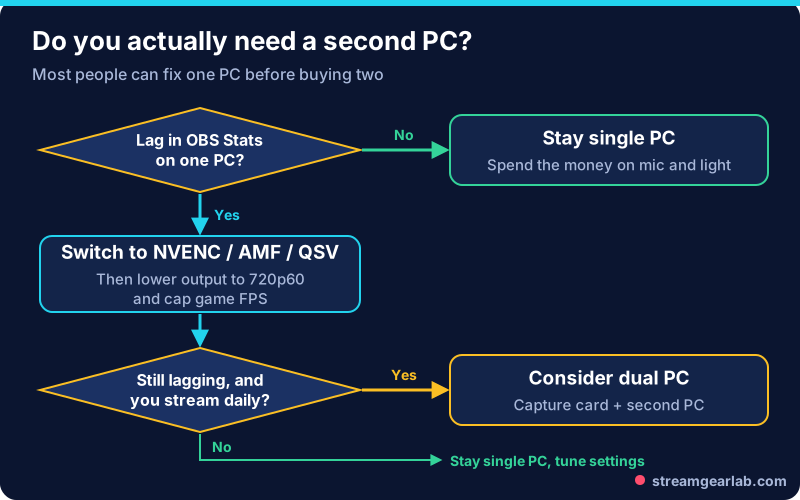
- Read the OBS Stats dock (View → Docks → Stats). Our dropped frames guide explains what each counter means.
- Switch to a hardware encoder in Settings → Output.
- Lower the output to 720p60 or 1080p30. See our 1080p60 vs 720p60 guide.
- Cap your game FPS so the GPU isn’t at 100% load.
- On a laptop, follow our laptop OBS settings.
Free tool: The OBS Settings Generator suggests an encoder, resolution and bitrate for your hardware and upload speed.
If the game still stutters with all of that done, and you stream most days, a second PC is a reasonable upgrade.
How a dual PC setup is wired
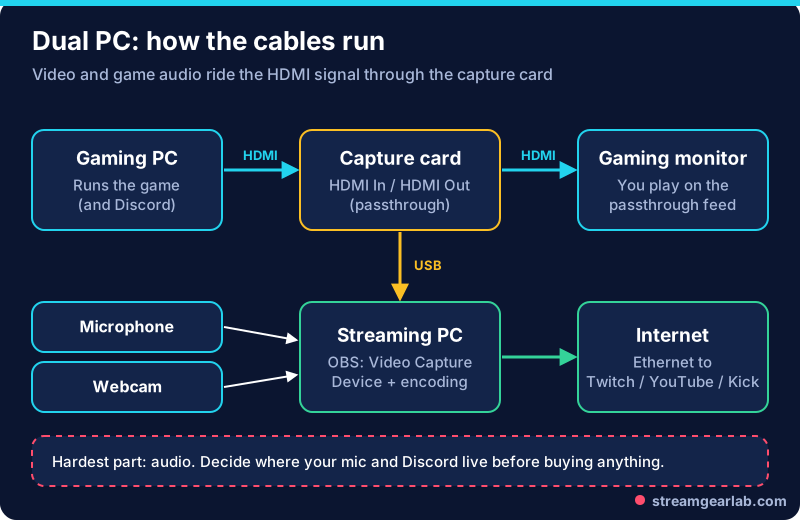
- Gaming PC HDMI out → capture card HDMI in.
- Capture card HDMI out → your gaming monitor. This passthrough means you play on the live signal, not the delayed capture.
- Capture card USB → streaming PC.
- On the streaming PC, add a Video Capture Device in OBS and choose the capture card.
- Plug the mic and webcam into the streaming PC, and connect it to the internet by Ethernet.
High-refresh monitors: some capture cards cannot pass through or capture at your monitor’s full refresh rate. Streamlabs’ dual PC guide describes cloning the gaming display to the capture card’s display, with the gaming monitor at 120/144 Hz and the capture output at 60 Hz. Check your card’s passthrough specs before you buy.
The hard part: audio
Game sound travels over HDMI with the video. Your mic and Discord are where it gets tricky:
| Problem | Common solution |
|---|---|
| Mic is on the streaming PC, but Discord runs on the gaming PC | Use a mixer or interface that feeds both PCs, or a network audio tool |
| Viewers need to hear Discord | Run Discord on the gaming PC so its audio goes through the HDMI capture |
| You want separate volume control in OBS | Network audio (e.g. Elgato Wave Cast, Windows 11 on both PCs) sends app audio to the streaming PC as separate sources |
Decide where each audio source lives before you buy anything. Whatever you choose, run a test recording and listen for echo or doubled voices. Our echo fix guide helps if you hear them.
Cost reality check
The second PC doesn’t need a strong GPU if it encodes with its own hardware encoder, but you still need a capture card and a capable machine. Price the full setup in the Streaming Gear Budget Builder. For most creators, the same money spent on a mic and lighting does more for the stream.
Frequently asked questions
Will a dual PC setup improve stream quality?
Not by itself. Quality is set by bitrate, resolution and encoder settings. A dual PC mainly protects game performance while streaming.
Can I use a laptop as the streaming PC?
Yes, if it has a decent hardware encoder and a USB port that suits the capture card. Plug it in and use Ethernet.
Do I need a capture card for a single PC?
No. A capture card is only needed for consoles or a second PC. On a single PC, OBS captures the game directly.
Is NDI an alternative to a capture card?
Network video tools can send video between PCs without a capture card, but they depend on your local network and add CPU/network load. A capture card is the simpler, more predictable starting point.