Twitch vs YouTube vs Kick for New Streamers (2026 Comparison)
Quick answer: pick Twitch if you want live-first discovery and a community built around chat. Pick YouTube if you’ll also post VODs, Shorts or tutorials, because its search keeps working long after you go offline. Pick Kick if you want subscription income early and its higher revenue share, and you’re comfortable on a smaller platform. Whichever you choose, the settings and gear are the same, so you can switch later.
The 2026 numbers side by side
All figures come from each platform’s help pages, checked in November 2026.
| Twitch | YouTube | Kick | |
|---|---|---|---|
| Start streaming | Immediately | Phone verification; first enable can take up to 24 h | Immediately |
| First money tier | Affiliate | YPP fan-funding tier | KICK Streamer |
| Requirements | 25 followers, 4+ hours on 4 separate days, 3+ average viewers (last 30 days) | 500 subs, 3 public uploads in 90 days, plus 3,000 watch hours (12 months) or 3M Shorts views (90 days) | 5 cumulative hours streamed |
| Next tier | Partner (by application) | Ads tier: 1,000 subs + 4,000 watch hours, or 10M Shorts views | Partner: 75 avg viewers, 30 h streamed, 25 subs, 250 followers and more (apply by email) |
| Headline sub/membership share | 50% (60–70% via Plus Program) | 70% (memberships, Super Chat) | 95% |
| Max recommended bitrate | 6,000 kbps | Up to 17,000 kbps at 1080p60 | 8,000 kbps |
YouTube has announced that from February 1, 2027, new applicants to the ads tier will need 8,000 watch hours or 20M Shorts views instead of 4,000 and 10M.
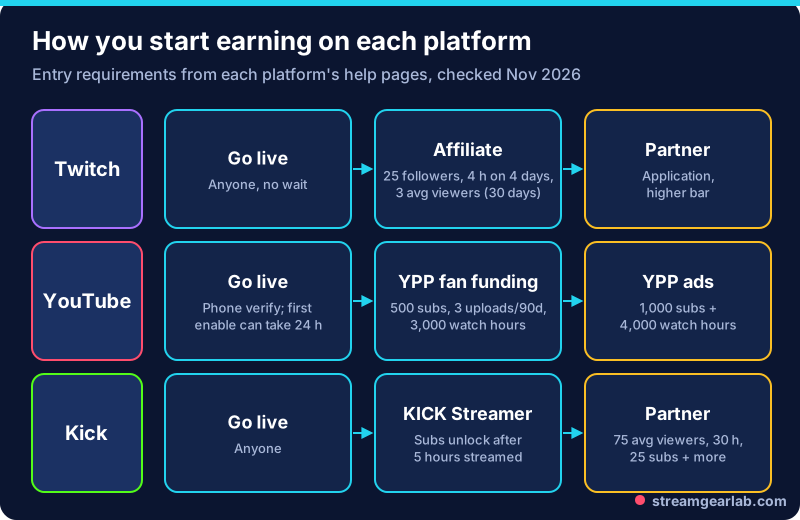
Discovery: who finds you, and how
- Twitch is built around browsing live channels by category. Small streams sit low in crowded categories, so pick a niche game or category where you appear on the first screen. Clips and raids from other streamers matter a lot.
- YouTube finds viewers through search and recommendations, including for your past streams. A stream titled like a question (“How to beat X boss”) can keep getting views for months. Shorts cut from your streams can feed new viewers back to your channel.
- Kick is a smaller platform with less competition in many categories, but also fewer viewers browsing. Expect to bring part of your audience with you from social media.
Money: the split matters less than you think
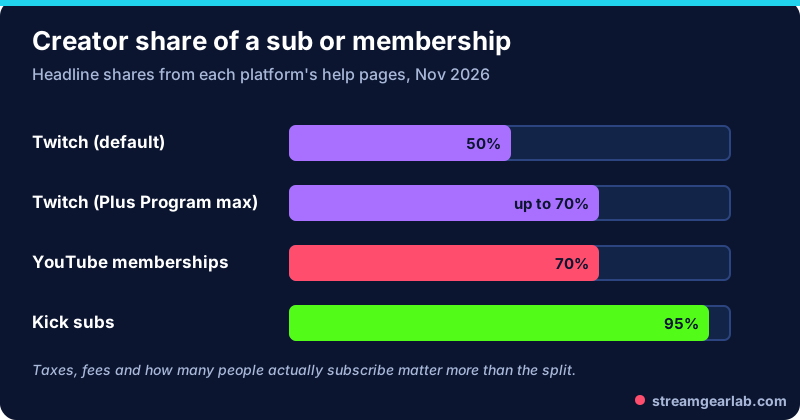
Kick’s 95% share stands out. But 95% of zero subs is zero, and in your first six months audience size beats the split. On Twitch, the Plus Program raises your share to 60% at 100 Plus Points or 70% at 300 Plus Points, if you hold that level for three months in a row. YouTube pays 70% on memberships and Super Chat once you reach the 500-subscriber tier.
Free tool: Going the Twitch route? The Twitch Affiliate Tracker shows how close you are to each requirement, and our guide to reaching Twitch Affiliate explains how to get there.
Which one should you pick?
| If you… | Start on |
|---|---|
| Play live-first games and love chatting | Twitch |
| Teach, review or make content people search for | YouTube |
| Want subs income early and already have followers elsewhere | Kick |
| Can’t decide | YouTube for the VOD value, or Twitch for live culture. Commit for 90 days before you judge |
Can you stream to more than one?
Yes, with some caveats. Multistreaming tools and the rules around them (especially Twitch’s simulcasting guidelines) are covered in StreamYard vs Restream vs OBS. One practical limit: you need upload bandwidth for each platform you stream to directly, unless a cloud service does the splitting for you.
Settings are nearly identical
All three accept H.264, CBR and a 2-second keyframe interval. The main difference is bitrate: Twitch is usually 6,000 kbps at most, Kick allows 8,000 kbps, and YouTube rewards more. For the full table and how to pick a resolution, see 1080p60 vs 720p60 stream settings.
Free tool: The OBS Settings Generator has presets for all three platforms.
Frequently asked questions
Which platform is easiest to grow on as a small streamer?
None of them is easy. YouTube tends to be the most forgiving over time, because your streams stay searchable. Twitch rewards consistency and networking with other streamers. Kick has less competition but fewer viewers.
Can I move my audience later?
Partly. Followers don’t transfer between platforms, so announce the move on social media and in your last few streams. Many streamers keep the old channel for a while.
Do I need 1,000 subscribers to go live on YouTube?
No. Live streaming from a computer needs a verified channel. Mobile live streaming has its own subscriber minimum, and below 1,000 subscribers YouTube may limit how many people can watch a mobile stream.
Are these requirements final?
No. Platforms change them often. YouTube’s February 2027 change is one example. Check the linked help pages before you plan around a number.